Splunk Mobile

Splunk Mobile

UX DESIGN ✻ RESEARCH

Role

Lead product designer

Collaborators

1 designer, 1 PM, 6 engineers

timeline

May 2025 - Present

About Splunk Mobile

About Splunk Mobile

I stepped into the Splunk Mobile↗ team during a period of total organizational transition. With the previous team terminated and no existing documentation, user lists, or product roadmap, I was tasked with designing for a "black box."

I spearheaded a dual-track initiative: delivering a high-value visualization saving feature while simultaneously re-establishing our Customer Insights Pipeline from scratch. By launching the "Saved Visualizations" feature, I not only addressed a critical executive use case but also leveraged the rollout to identify and recruit a new cohort of beta testers, effectively rebuilding the product’s research foundation.

Initial challenges

Initial challenges

The primary hurdle was a complete lack of institutional knowledge. There was no "Why" behind the current app’s architecture and zero access to existing customers.

Data scarcity: No inherited personas, journey maps, or usability benchmarks.

Knowledge gap: A newly hired engineering team with no historical context on the codebase.

Market pressure: A need to prove the mobile app's value to high-level stakeholders (executives) to justify continued investment.

The strategic framework

The strategic framework

  1. Contextual discovery: I leaned into stakeholder expertise, partnering with the Director of Engineering to identify critical market gaps. His observations from previous Splunk user conferences (.conf) revealed a high-impact use case: Executive Mobility. High-level stakeholders struggled to access heavy web dashboards on laptops during mobile-first scenarios (like meetings or transit), signaling a need for a lightweight, 'glanceable' mobile experience.

  1. The MVP catalyst: I prioritized the "Saved Visualizations" feature as our North Star for the relaunch. The goal was to transform the app into a personalized command center, allowing executives to pin mission-critical metrics to their home screen for instant access.

  1. Tactical research: Recognizing that we lacked a user database, I designed a rollout plan that used the .conf25 conference as a primary research site. My strategy was to use the feature launch to attract power users, enabling us to:

    • Rebuild our customer insights pipeline: Recapture user demographics and build a permanent research cohort.

    • Validate via usability testing: Run live, high-fidelity testing on the new feature in a real-world setting.

  1. Future scalability: By stabilizing the user foundation and the mobile experience first, I created the necessary "data-readiness" to pursue advanced AI-driven features in the next product cycle.

Saved visualizations MVP

Saved visualizations MVP

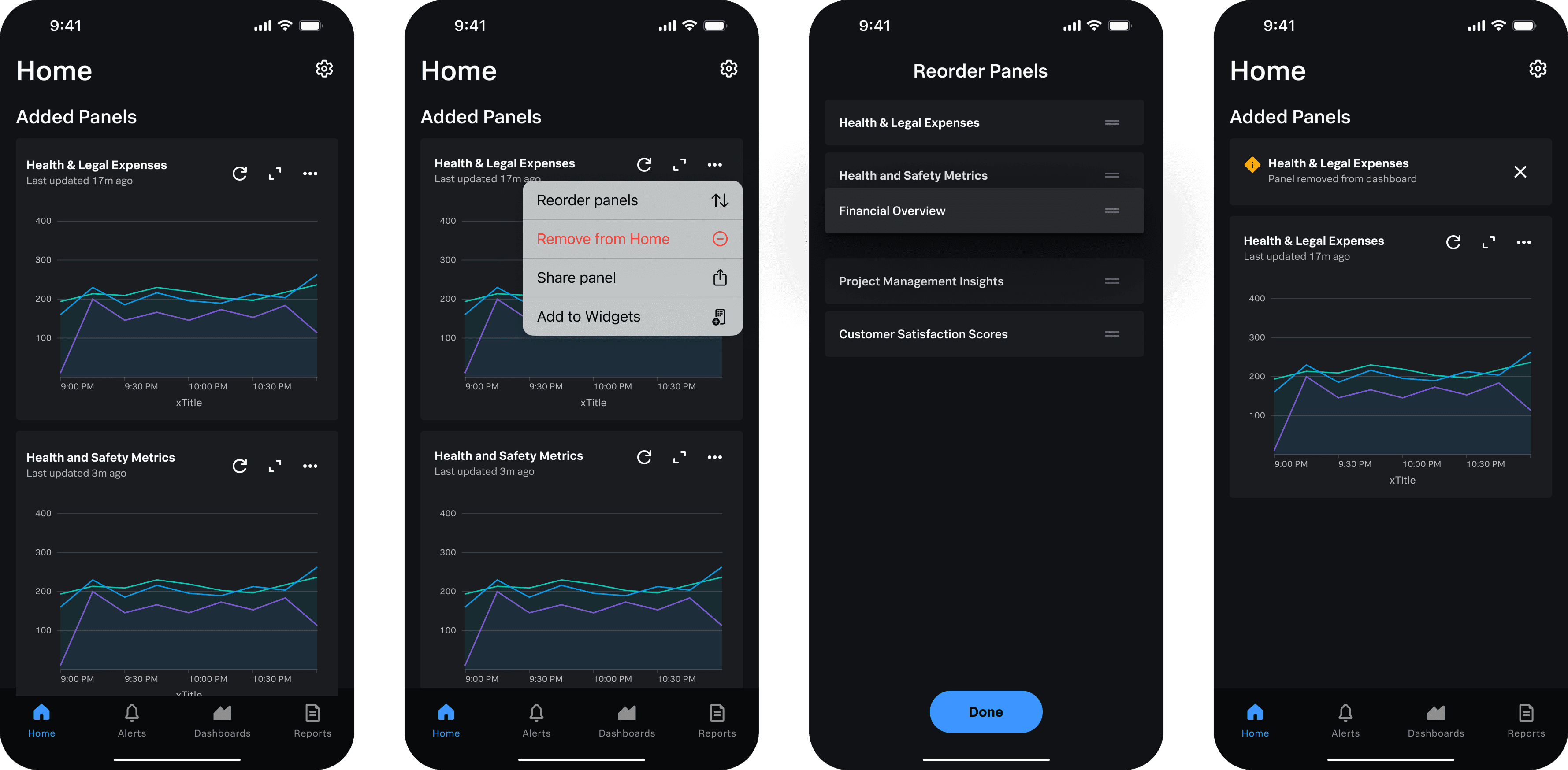
Saved visualizations is a feature that reduces the data discovery friction. Instead of having to manually search through multiple different dashboards to locate specific visual panels, this feature would allow users to find them once and save them to their home screen for quick future access.

I had one month to design in order for the MVP to be done before the conference. I focused on key requirements including:

Dynamic customization: Drag-and-drop reordering of panels, sharing capabilities, and widget functionality

Empty/error/removed states: Ensuring that the home page worked regardless of what state it was in

Succinct tutorial: There was not enough time to create a full onboarding flow, but users still needed to know how the function worked.

Despite the time crunch, I am first and foremost a champion of good user experience. I advocated strongly for the next few features to be added to the MVP+1 release as I felt like they were important for a seamless flow.

Automatically customized home screen: Content on home screen should show relevant information to the user when they first open the app. Some ideas I suggested included recent dashboards, critical alerts to investigate, and a "What's New" section

Onboarding flow: The mobile app has no flow to onboard users. The saved visualization feature is helpful, but also hidden under a kebab menu. I sketched out ideas on how to introduce a new user to the application

Removing the "Add to Widgets" feature: The current widget feature is meant to add a visualization to the user's phone home screen, not within the app. Having this feature be set in the application is not a familiar pattern and the naming can get confusing with the new saving feature.

Two different proposed flows for onboarding.

Two different proposed flows for onboarding.

.conf25 Research

.conf25 Research

With the central UX research team at capacity, I recognized that our path forward would remain stalled without primary user data. I took this opportunity to first and foremost, find Splunk Mobile users and find a general persona of who uses the application.

Throughout the three-day conference, myself and two Mobile team members reached out to attendees to take surveys, look through the home screen flow, and generally talk about their experience using Splunk Mobile. I was pleasantly surprised to find many attendees have heard of Splunk Mobile around 4-5 years ago. They all noted that the talk about it died down, and some of them were even on the previous beta-tester list. I took this opportunity to reconnected with our user base.

For the home screen, testing revealed issues with touch-target accessibility, and the previously mentioned confusion with "Saved widget" vs. "Saved visualization." It was vindicating to see my design intuition backed by actual user feedback, and allowed for my changed to be pushed through.

My Slack message to the team after .conf25, sharing key insights and proposing next steps.

My Slack message to the team after .conf25, sharing key insights and proposing next steps.

The two booths where I conducted surveys, interviews, and usability testing. .conf25 was also my first time in Boston!

The two booths where I conducted surveys, interviews, and usability testing. .conf25 was also my first time in Boston!

Looking Ahead

Looking Ahead

I'm currently leading an exciting AI project for investigating critical alerts and creating visualizations on the go. The project is still in progress, so please contact me for more information.

👋 Thanks for stopping by!

👋 Thanks for stopping by!

👋 Thanks for stopping by!